Tools
Runners
Run or debug a specific method in isolation — without starting your entire application — using C# Runners.
Overview
Section titled “Overview”C# Runners let you create lightweight entry points for individual methods inside projects that use the .NET dependency injection (DI) container. Instead of spinning up the whole API, preparing payloads, and routing a request through every middleware layer, you create a Runner that wires up the DI container and calls the method directly.
Prerequisite: Runners are only supported for projects that contain a
Program.csfile and use the .NET generic host / DI container (IServiceCollection). Console apps, Web APIs, Worker Services, and similar host-based projects are all supported.
Video Tutorial
Section titled “Video Tutorial”
▶ Watch the full C# Runners tutorial on YouTube
How It Works
Section titled “How It Works”When you create a Runner the extension:
- Creates a separate runner project (not added to your solution, not committed to source control) next to your source project.
- Generates a runner class that imports your project’s DI configuration from
Program.csand injects the required service into its constructor. - Provides a
Run()method where you fill in the parameters and call the target method. - Registers a run / debug code lens on the runner class so you can launch it with one click.
The runner project reuses your existing appsettings.{Environment}.json files, which means real configuration values (including environment-specific secrets) are available at debug time.
Creating a Runner
Section titled “Creating a Runner”From the CodeLens in the Editor
Section titled “From the CodeLens in the Editor”The fastest way to create a runner is directly from the source file containing the method you want to test:
- Open a C# file in a DI-based project
- Click the Create Runner CodeLens that appears above the class or method
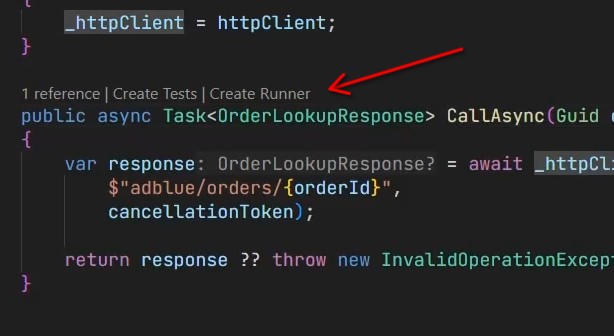
- Enter a name for the runner when prompted
- The extension generates the runner file and opens it automatically
From the Tools Panel
Section titled “From the Tools Panel”- Open the C# Dev Tools sidebar
- Expand Tools → Runners
- Click the + (Create Runner) button
Working with Runners
Section titled “Working with Runners”Once created, the runner file is ready to use:
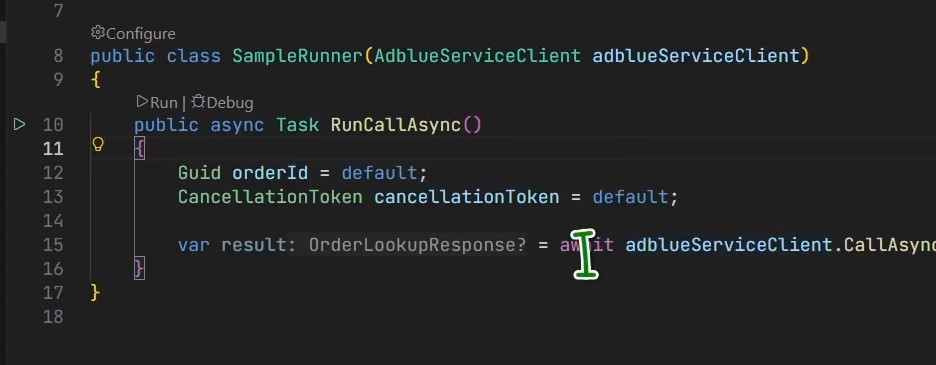
- The target service is automatically injected into the runner’s constructor based on your DI registration.
- The
Run()method is a plain C# method — add parameters, helper variables,Console.WriteLinecalls, or breakpoints just as in any other file. - Full C# LSP support is available: hover info, go to definition, quick fixes, and IntelliSense all work normally.
- The runner file is not tracked by source control (the runner project is excluded from the solution and placed outside the repository tree).
Setting Breakpoints
Section titled “Setting Breakpoints”Add a breakpoint anywhere in the runner file or in the code it calls, then click Debug from the code lens. The debugger attaches just like a normal launch.
Runner Configuration
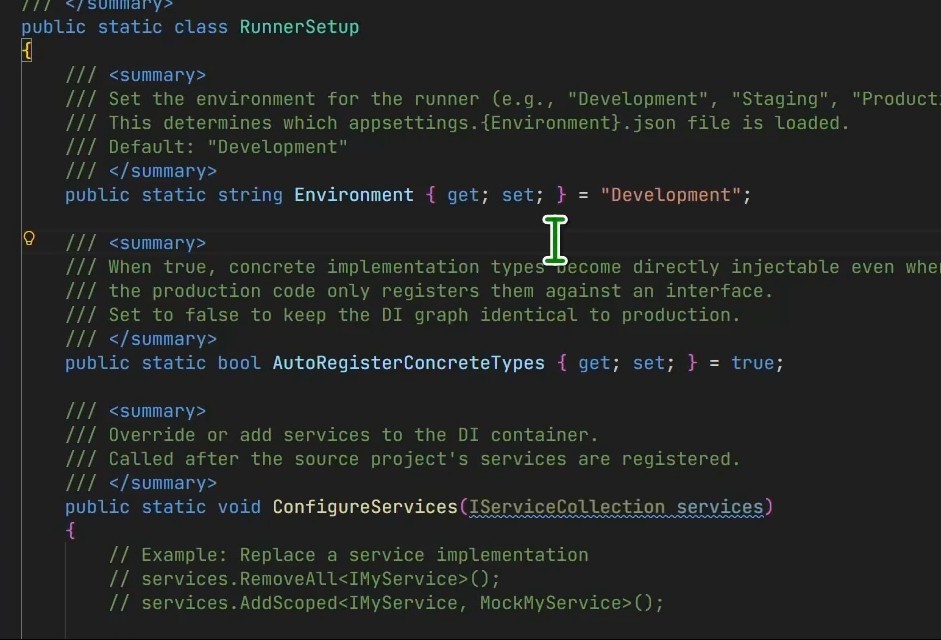
Section titled “Runner Configuration”Each runner has its own configuration panel:
| Setting | Description |
|---|---|
| Environment | Controls which appsettings.{Environment}.json is loaded. Defaults to Development; change to Production to use production config values. |
| Auto Register Concrete Types | When enabled, concrete types can be injected directly into the runner even if only their interface is registered in the DI container. |
| Configure Services | A hook method where you can add, replace, or remove DI registrations before the runner executes — useful for mocking dependencies. |
Accessing Configuration
Section titled “Accessing Configuration”- Click the Configure code lens that appears at the top of the runner file, or
- Open Tools → Runners in the sidebar and click the settings icon next to the runner.
Runner Explorer
Section titled “Runner Explorer”All runners are visible in the Runner Explorer section of the Tools panel:
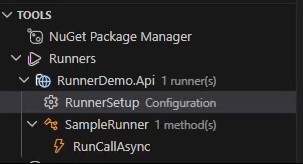
From the Runner Explorer you can:
- See all runners grouped by source project
- Run or debug any runner with one click
- Open the runner configuration
- Delete a runner
When to Use Runners
Section titled “When to Use Runners”| Scenario | Benefit |
|---|---|
| Debugging a service deep in the DI graph | No need to set up HTTP requests, authentication, or test data pipelines |
| Verifying integration with a real database / API | Load real credentials via appsettings.Production.json in isolation |
| Reproducing a bug from production | Replay exact inputs without the full application stack |
| Rapid iteration on business logic | Edit → Run cycle is faster than starting the whole host |
Limitations
Section titled “Limitations”- Requires a
Program.csthat configuresIServiceCollection(generic host pattern). - Projects that do not use a DI container (e.g. plain class libraries or legacy
Main()apps without the generic host) are not supported. - The generated runner project is excluded from source control and is not added to the
.slnfile.